Runbook
Build a high-net-worth lead list from the ground up
Most lead lists arrive as a spreadsheet somebody else assembled, in which case everyone who bought it has the same names. This runbook builds one from public record instead: you pick the ground, the county's own assessed values decide who is worth looking at, and you keep the evidence for each name you add. It is the loop the product was built around, written out in order.
Before you start
What this needs, and what did not exist before
This is a short list on purpose. The prerequisites are a territory and a subscription, because the data the run works from is already public record and already on the map.
What you need
A territory you can speak about
One ZIP code, one suburb, or a few square miles you would recognize from the street. The run works anywhere in the US, but the qualification step at the end depends on you knowing whether a name in that area is plausibly yours to call, and no software supplies that.
An active subscription
Reading the map costs nothing, but the lookups spend credits, and every billed action requires a live plan. A new subscriber gets 100 credits across a 7-day trial, which is enough to run this at roughly a quarter scale before deciding.
A view on what qualifies
Decide your assessed-value floor before you open the map, not after you have looked at it. The filter has five bands and it is very easy to keep sliding the floor down until the list is long, which is how you end up with a list of everyone.
What you end up with
Named people, not addresses
Each entry is a person with a name, city, and where possible an email and phone, saved with the parcel that led you to them still attached. The property is the reason the person is on the list, and it stays visible in the record.
A wealth range per name
Every saved profile gets four estimated ranges written after the fact: net worth, income, investible assets, and total assets. They are AI-generated ranges with a confidence score, not figures, and they are the only estimated layer in the whole run.
The trail that produced each one
Research profiles carry a summary of how the identification was made and how many independent sources corroborated it. When a name later turns out to be wrong, you can see which step made the wrong turn instead of guessing.
The run
Six steps, in this order
The order matters more than it looks. Filtering before you zoom keeps you from reading a thousand irrelevant owner labels; splitting person-owned from entity-owned deeds before you spend anything keeps you from paying 25 credits for an answer a 5-credit lookup would have given you.
- 1No credits
Pick the territory
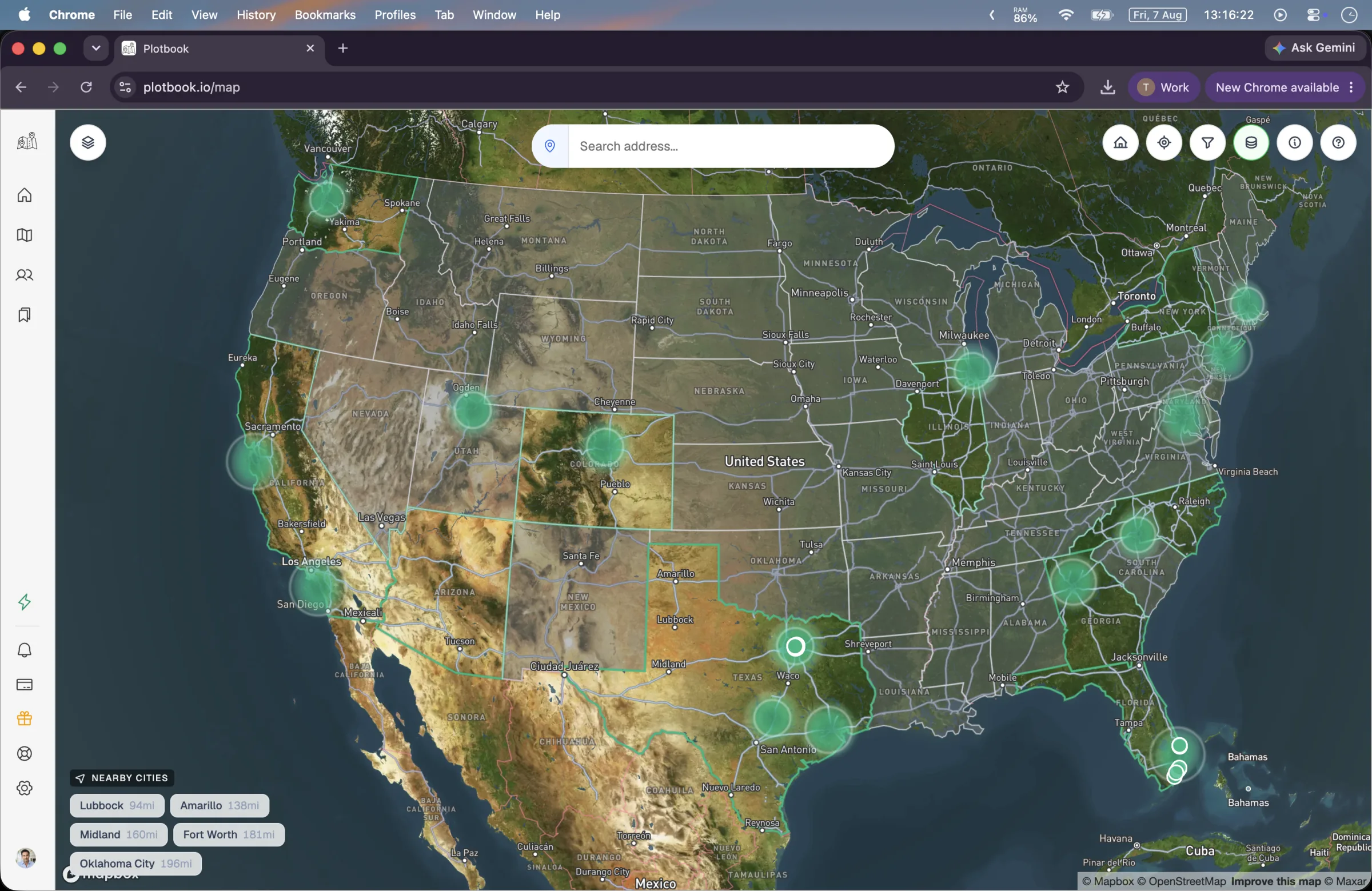
Search the map for a city, neighborhood, or ZIP code, or use the wealth hotspot layer to choose a market before you commit to one.
The search bar takes an address, a city, or a ZIP and resolves it through Mapbox geocoding, so you can start from whatever you actually know. Your last ten searches are kept locally, which matters more than it sounds like when you are working several territories in a week.
If you do not have a market picked yet, zoom out instead. Between zoom 3 and 10 the map renders a heatmap over 232 hand-curated high-net-worth ZIP codes, and between zoom 4 and 10 those collapse into clusters graded from $ to $$$$ by wealth density. Clicking one flies you to it. A nearby-areas widget lists up to five wealthy areas close to wherever you are looking.
Treat the hotspots as a starting suggestion and nothing more. They are a curated list of ZIP codes, not a computed measure of household wealth, and the real qualification happens on the parcels underneath them.
- 2No credits
Filter by assessed value
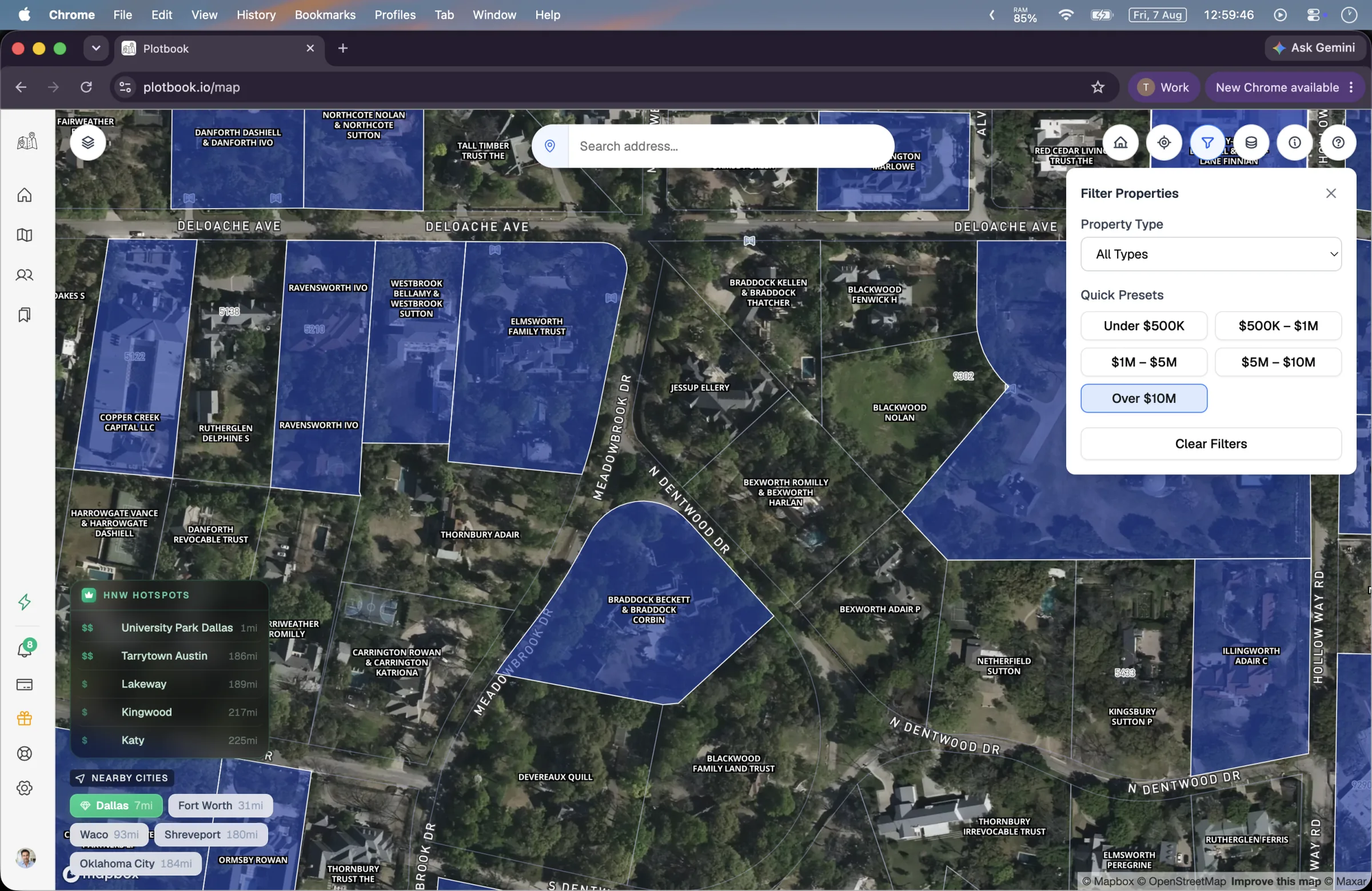
Open the filters panel and switch on the value bands you want. Everything below your floor drops out of the color coding.
Parcels are colored by the county's assessed value in six bands: unknown, under $500K, $500K to $1M, $1M to $5M, $5M to $10M, and over $10M. The filter presets match those bands exactly, so choosing a floor is one click rather than a form.
Filtered-out parcels are painted out but keep a dimmed outline and stay clickable. That is deliberate: you can still see the shape of the street and check a neighbor without turning the filter off and losing your place. Your filter selection persists across sessions, so a territory you set up on Monday is still set up on Thursday.
One honest caveat that shapes how you should read the result: assessed value is what a county assessor recorded for tax purposes, not market value, and the relationship between the two varies by state and by how recently the property changed hands. It is an excellent relative signal within one county and a poor absolute one across two.
- Six bands, five filter presets, all toggleable independently.
- The unknown band is not a gap in Plotbook — it is a parcel the county has no assessed value published for.
- There is no property-type filter. The panel's Residential/Commercial control does not affect what is drawn.
Watch for: Setting the floor at over $10M in a market that has almost no parcels that high leaves you staring at an empty map and concluding the data is thin. Start one band lower than you think and move up.
- 3No credits
Read the deed owners off the map
Zoom to 16 or closer. Every parcel is labeled with the owner name printed on the deed, straight off the tile, at no credit cost.
This is the step that has no equivalent in a list-based tool, and it is free. Parcels start drawing at zoom 14; from zoom 16 every one of them carries its deed owner name. Between 14 and 16 an overlay labels the large holdings early and sorts them so the highest-value parcels win label collisions, which is how you spot the estate on the corner before you can read the street.
Read a whole street before you spend anything. The names themselves are the first qualification pass, and they are the reason the split in the next step is possible at all: you can see from the label alone whether a deed says a person or says an LLC.
Watch for: The map search bar does not search owner names. It resolves places, not people. If you are trying to find a specific person's property, that is people search, not the map.
- 4No credits
Split person-owned from entity-owned
Work through the parcels above your floor and sort each one into two piles: deeds naming a human, and deeds naming an LLC, trust, corporation, or estate.
This is the single highest-leverage step in the run and it costs nothing but attention. The two piles get different treatment, at different prices, with different odds, and mixing them is the most common way to waste credits here.
A deed naming a person is answerable instantly from residential records. A deed naming an entity genuinely is not — the residential databases do not contain a human for that address, so no instant lookup can invent one. That one goes to research.
Opening a parcel costs nothing. The drawer gives you the assessed value, the full address, the owner, and the use type, and you can open as many as you like before spending a credit. The first billed action in this entire run is the lookup in the next step.
Watch for: Institutional owners — banks, government bodies, HOAs, REITs — belong in neither pile. Send one to research and it short-circuits without charging you, but it is faster to skip it on sight.
- 55 credits per instant lookup · 25 per research run, charged only on success
Run the matching lookup on each pile
Person-named deeds get the instant Owner Lookup from the property drawer. Entity-named deeds get a deep research run.
The instant lookup queries residential records for that address and returns the owners and the residents, each badged by role, with names, ages, phones, and emails. Household members show up alongside the owner, which frequently matters — the person on the deed is not always the person you want.
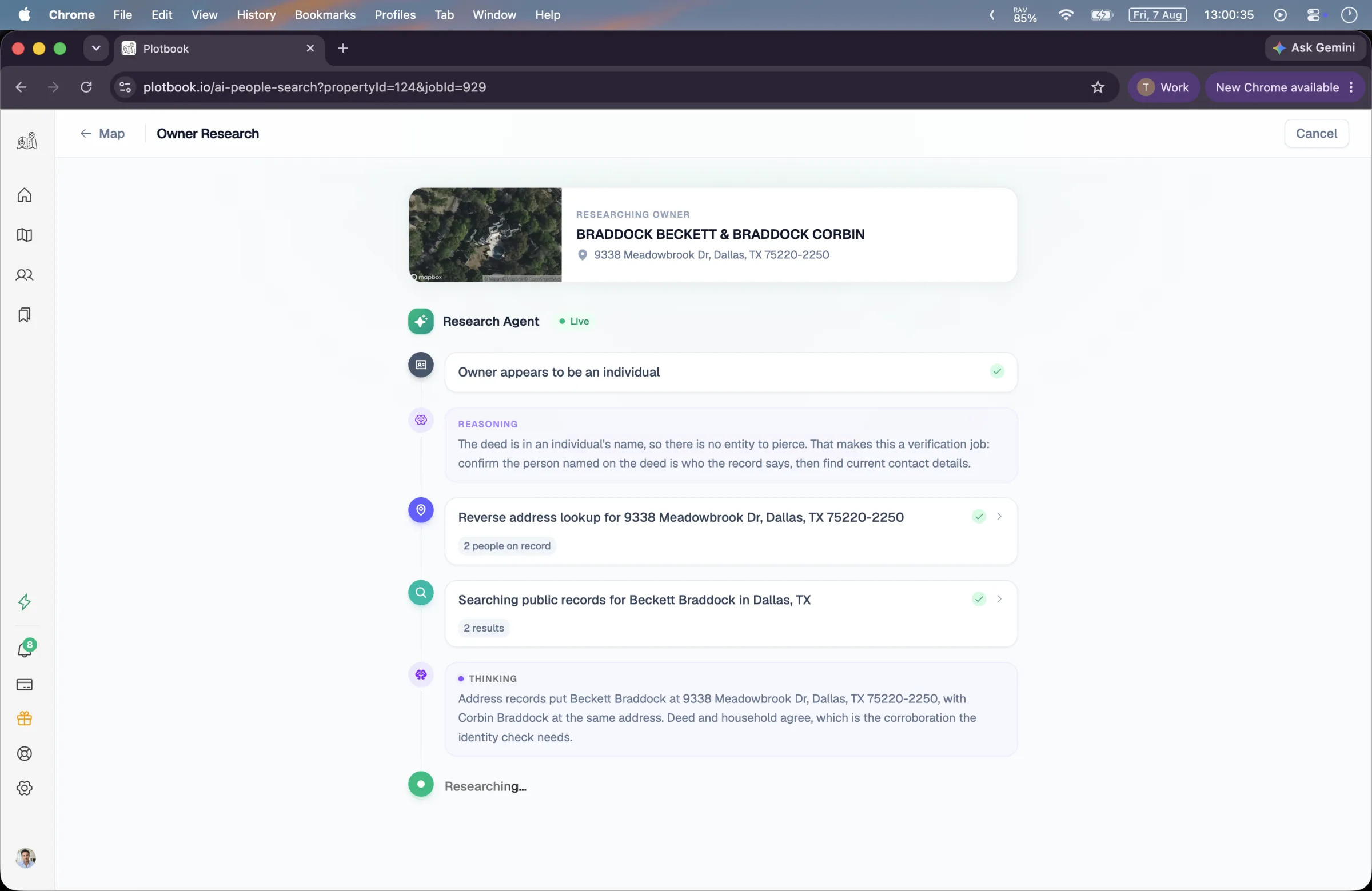
The research path is a different animal. It classifies the entity type, seeds itself with deterministic reverse-address lookups before any AI reasoning starts, then works registry aggregators, county records, open-web sources, and federal campaign-finance filings until something corroborates. It runs in the background, so you can close the tab and start the next one; a notification arrives when it lands.
Research is charged only when it succeeds. A run that fails, gets cancelled, finds nothing, or hits an institutional owner is not charged at all, and the failure notification says so explicitly.
Watch for: Do not queue twenty research runs at once on a trial balance. At 25 credits each, four of them is the whole trial allowance.
- 65 credits to keep a lookup result · 5 to export, Professional and Enterprise only
Keep the results and export the list
Save the people worth keeping, let the wealth estimates finish, then export the finished list as CSV.
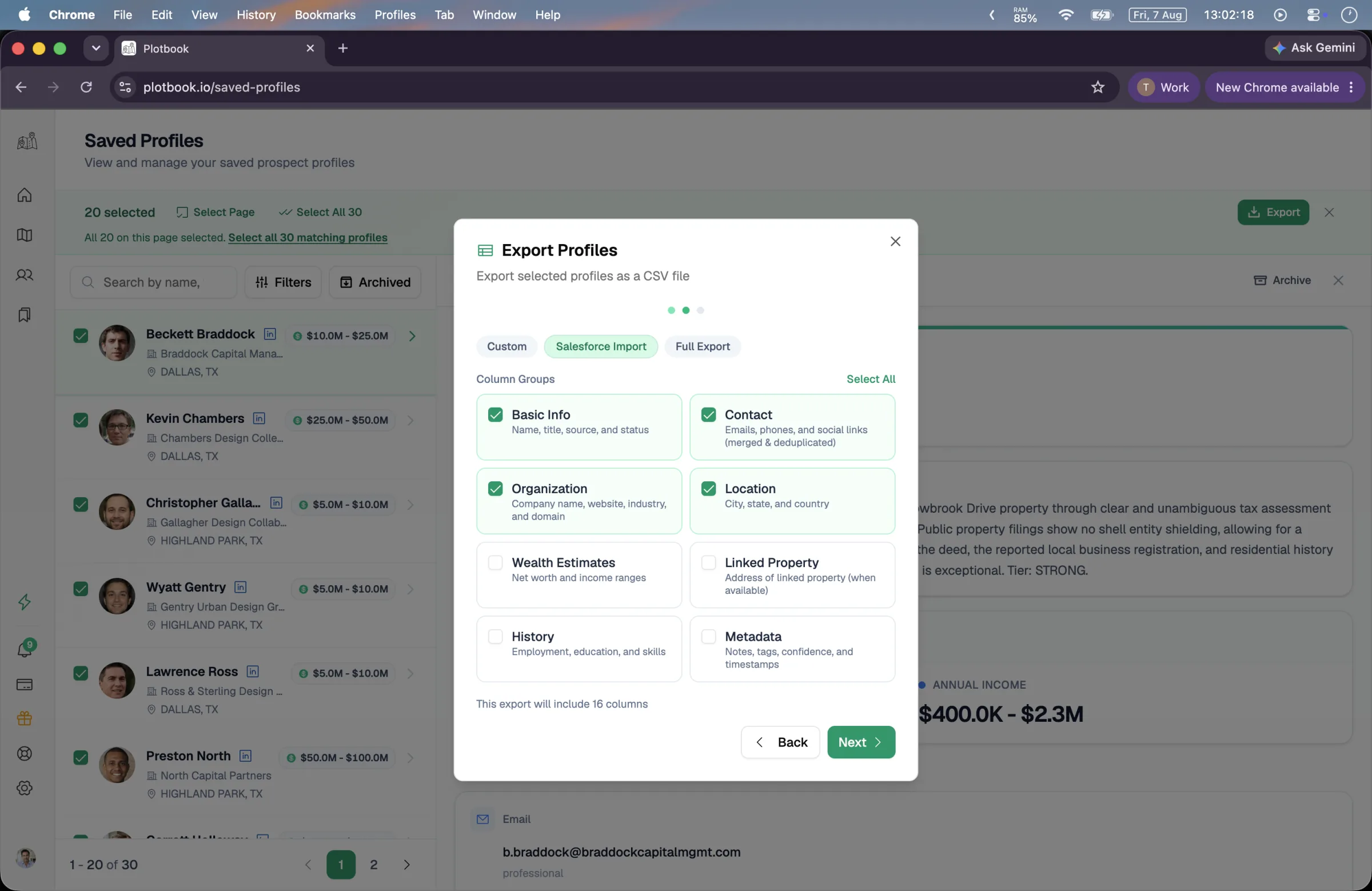
Research results save themselves. Lookup results do not: keeping one unlocks the person's full residential record for 5 credits, and the save itself is free. Once a profile exists, a separate step writes the four wealth ranges from the parcel, any other properties the person is recorded as owning, and their career and organization. The list shows an estimating state while that runs and fills in a net-worth chip when it finishes.
Export costs 5 credits and requires Professional or Enterprise. You pick from eight column groups covering 26 columns, or take one of three presets: a lean default, a Salesforce-shaped import, or everything. The file is generated server-side and handed back as a private download link valid for 48 hours, capped at 5,000 profiles per export.
The honest framing on the CSV: it is a file, not an integration. There is no live CRM sync in either direction, and the Salesforce preset is column mapping rather than a connector.
What one pass costs
The same run, priced out
Credit costs are the same numbers the app bills from, so this table cannot drift from your invoice. The mix below is a realistic one rather than a flattering one: most deeds above a $1M floor still name a person, and the entity-held minority is where the expensive work is.
One ZIP code, filtered to parcels assessed over $1M, worked until 25 prospects are in the book: 40 parcels read, 18 person-named deeds, 7 entity-named deeds.
- Reading the map, all 40 parcels
- Free
- Panning, searching, filtering by value band, reading the deed owner names, and opening the property drawer for assessed value, address, owner, and use type. None of it is billed on any plan.
- 18 instant owner lookups
- 9018 × 5
- The person-named deeds. Returns owners and residents at the address with contact details.
- Keeping those 18 as profiles
- 9018 × 5
- Unlocking a lookup result pulls the full record in behind it. The save and the wealth estimate it starts cost nothing.
- 7 deep research runs
- 1757 × 25
- The entity-named deeds. Charged only on success, and research profiles save themselves at no extra cost.
- One CSV export
- 5
- Professional and Enterprise only. Up to 5,000 profiles per file, delivered as a 48-hour private link.
- Total
- 360
- Credits for the worked example above, at the same prices the app bills from.
Note what is not in the table: every free line is free on every plan, including the trial, so the qualification work happens before you spend anything. The pass above fits inside one month of the Starter allowance and is a small fraction of Professional. It does not fit inside the trial — 100 credits is about six instant lookups or four research runs, so a trial is for testing the method on a street you already know the answer for, not for building the list. Failed billed operations refund automatically.
Where it goes wrong
The four ways this run disappoints people
All four are structural rather than occasional, which means knowing about them in advance is most of the fix.
Assessed value is not market value
A county assessor's figure can trail a sale by years and is calculated differently in every state. Within one county it ranks properties usefully. Across two counties it does not compare, and a list built on the assumption that it does will be skewed toward wherever assessment practice is most aggressive.
The wealthy are disproportionately entity-held
The higher your value floor, the larger the share of deeds naming an LLC or a trust, and those are the 25-credit runs rather than the 5-credit ones. A list built above $5M costs materially more per name than the same list built at $1M.
Contact coverage is uneven
Residential and professional records do not have an email and a phone for everyone. Some profiles land with a name, a city, and nothing to dial. Coverage varies by person and by market, and nothing in the product can tell you in advance which names will come back thin.
The list is not a pipeline
Saved profiles is a book of researched people with notes, archive, and search. It has no tagging, no stages, no kanban, no assignment, and no sort control beyond newest-first. If you want stages, the CSV goes into whatever system already has them.
Variations
Same run, different shape
The procedure holds; what changes is where you set the floor and which pile you spend on.
- 01
On a trial balance
Pick one street rather than one ZIP. Read the owner labels for free across the whole neighborhood, then spend the 100 trial credits on four or five lookups on properties whose owners you can independently verify. You are testing whether the answers are right, not building inventory.
- 02
When you only want entity-held property
Skip the instant-lookup pile entirely and send every LLC, trust, and corporate deed above your floor to research. This is the expensive version and also the differentiated one, because those are the owners a list vendor could not sell you. The dedicated runbook for it is linked below.
- 03
Working several markets at once
Filters and map position persist per session, and research runs are durable and notify on completion, so the natural rhythm is to queue research in one territory, move to the next, and come back to the notifications rather than watching a timeline.
- 04
Starting from a person instead of a place
If you already have names and want the property behind them, invert the run: use people search to find the person first, save the profile, and let the linked parcel come in with it. The map is the discovery surface, not the only entry point.
Questions
What people ask about this run
Keep reading
Find the owner behind an LLC
The expensive pile from step four, run properly, including the anonymity states.
Map million-dollar homes
The free half of this run in more depth: bands, zoom levels, and how to read a street.
Saved profiles
What a finished prospect record actually holds, and how export works.
Wealth estimation
What the four ranges on each name are built from, and what they are not.
Run it once on a street you already know
The fastest way to judge this is to point it at a property whose owner you can already name, and see whether the run agrees with you. That is the test we would want it judged on.
New subscribers start with 7 days and 100 credits. We email you before the trial ends.