For private wealth advisors
Your best next client already lives in your territory
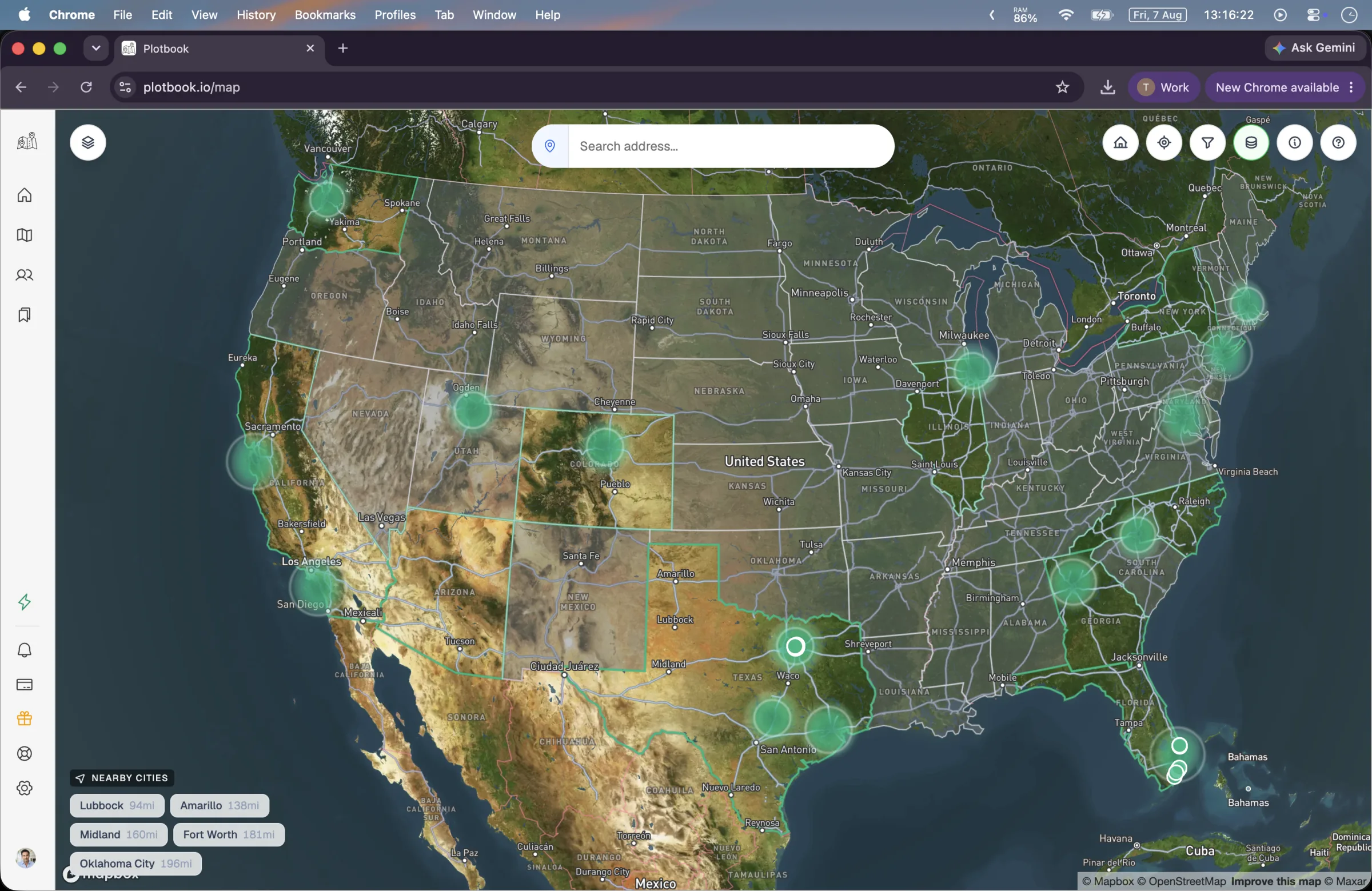
Most prospecting tools start with a list somebody else built. Plotbook starts with the ground you already cover. Open your market on a map where every parcel is colored by assessed value and labeled with the name on the deed, pick the households that match your minimum, and work outward to the person, their contact details, and an estimate of what they are worth.
The job today
Referrals are finite. Purchased lists are everyone else's
A book that grows on introductions grows at the speed of the introductions. When that slows, the usual answer is a list: a segment bought from a data vendor, scored on somebody's model, delivered as a spreadsheet of names you have no relationship with and no reason to believe. The advisor down the road bought a similar one.
The other problem with a bought list is that it is name-first. You cannot ask it the question you actually have, which is geographic: who, within the forty minutes I am willing to drive, lives in a house worth more than my minimum. Territory is how an advisory practice really works, and it is the one axis a name-first tool cannot search.
Property records answer that question directly, and they are public. What has always made them impractical is the shape they come in: fifty states, thousands of county portals, one record at a time, and a deed line that increasingly reads as a trust or an LLC instead of a person.
How advisors work it
From a neighborhood to a first call
None of this is a batch job you kick off and hope about. It is a loop you run for an hour, on a market you know well enough to catch it being wrong.
- 01
Open the market you actually cover
Search an address, a city, or a ZIP and the map lands there. Parcels draw in from zoom 14, each colored by its assessed value across six bands, so the shape of the money in a neighborhood is visible before you read a single record.
- 02
Filter to your minimum
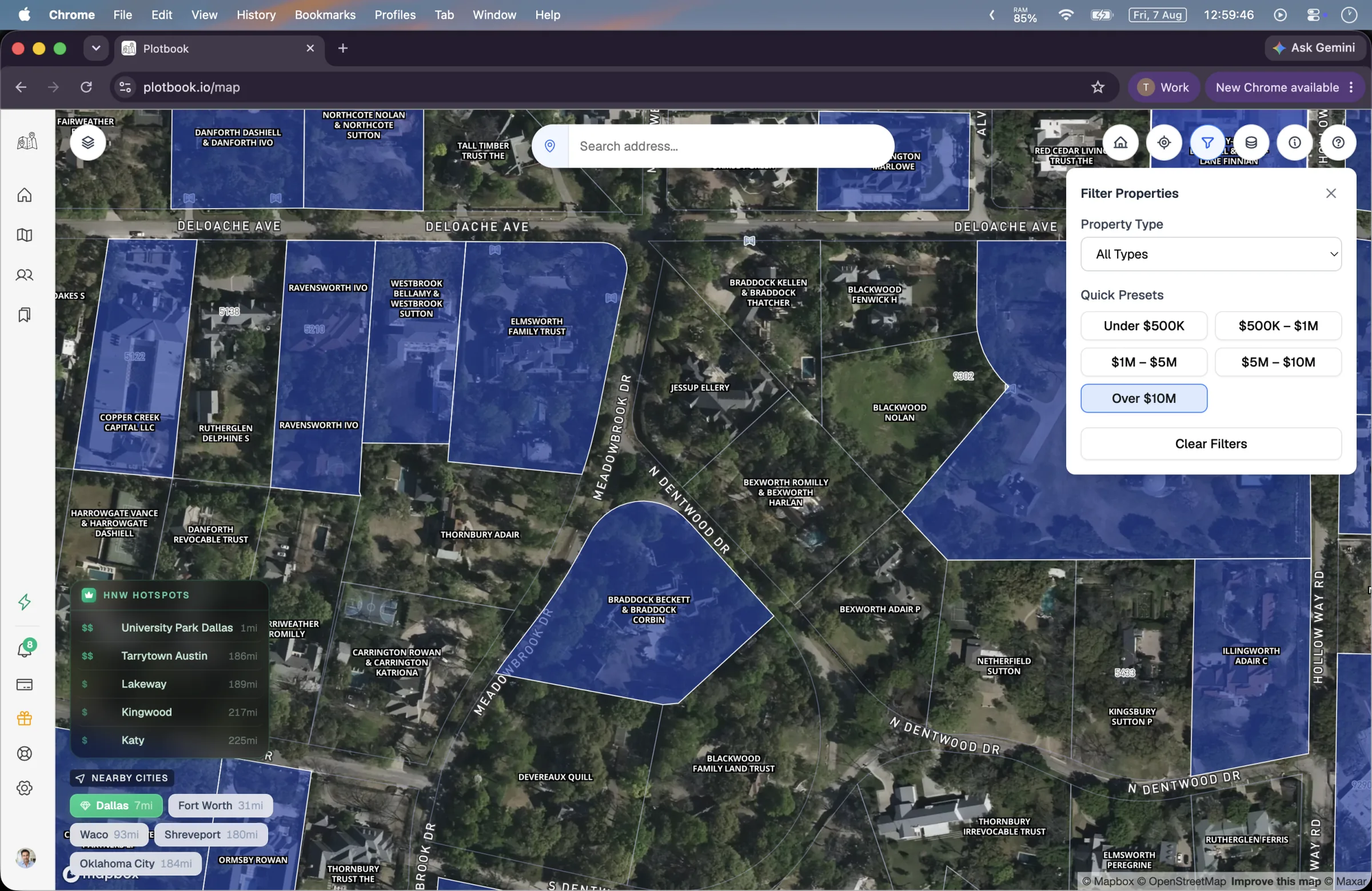
Five value presets match the legend bands: under $500K, $500K to $1M, $1M to $5M, $5M to $10M, and over $10M. Set the floor where your practice actually starts and the rest of the street dims out. The filter persists between sessions, so your territory stays the way you left it.
- 03
Read the deed
From zoom 16 every parcel carries the owner name straight off the county record. Click one and the drawer shows the assessed value, the full address, the owner of record, and the use type. This is the moment where you learn whether you are looking at a household or a holding company.
- 04
Identify the household, or research the entity
When the deed names a person, an instant Owner Lookup returns the owners and residents at that address together, with ages, phone numbers, and email addresses, role badged so you can see who is who. When the deed names an LLC or a family trust, the research agent takes the case instead and works registries, mailing addresses, and professional databases until it reaches a named person.
- 05
Keep it, then take it to your CRM
Every result saves into one prospect book with its wealth estimate, contact details, research summary, and the parcel it came from. Add your own notes on the record. When you are ready to work the list, export a CSV using the Salesforce Import preset and load it into whatever system your firm runs.
Territory, not a segment
A market you can check against what you already know
The fastest way to judge a prospecting tool is to point it at a neighborhood you know cold and see whether it tells you the truth. Plotbook is built to survive that test, because the layer underneath it is public record rather than a model: parcel boundaries, assessed value, owner of record, and use type, aggregated nationally from Regrid across 150M+ parcels.
On top of that sits one piece of curation: 232 hand-picked high net worth ZIP codes, drawn as a heatmap when you are zoomed out and as hotspot markers as you come in. It is a way to find the pockets of a metro you have not worked yet, not a claim about any individual household.
- Six assessed-value bands with a legend you can toggle off
- Value filters that persist across sessions, so your territory stays set
- Owner names read straight off the county record, not inferred
- A nearby wealthy areas panel for the parts of a metro you have not worked
The prospect book
Research that accumulates instead of evaporating
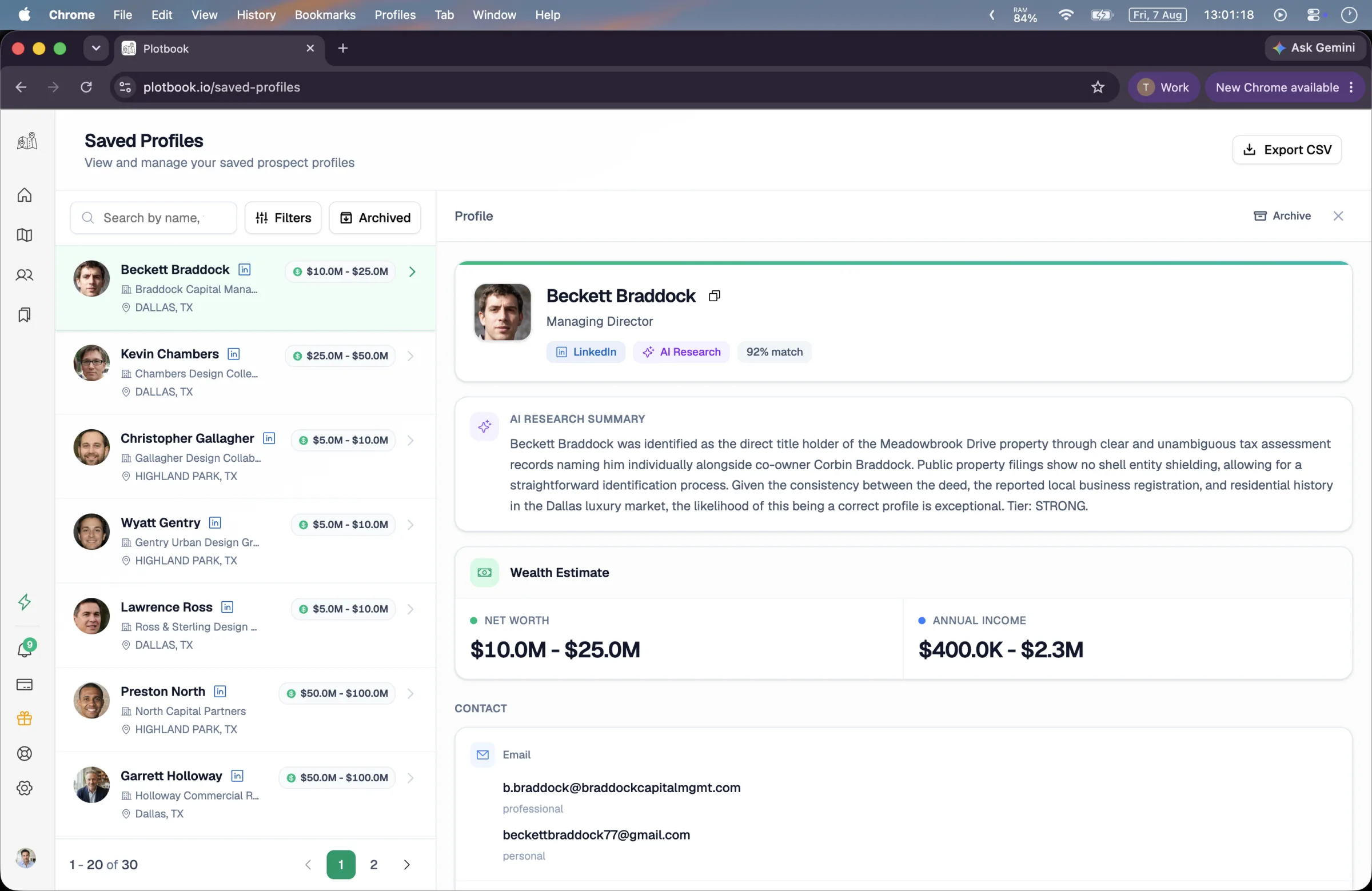
Everything you look up lands in one place. A saved profile carries the name, title, and employer; professional and personal emails; phone numbers; LinkedIn and employment history; the property it came from; a written research summary explaining how the identification was made; a confidence score; and a four-band wealth estimate covering net worth, income, investible assets, and total assets, each as a range.
Your own notes live on the record, which matters more than it sounds: the reason you flagged someone in March is the thing you will have forgotten by September. Profiles you are done with archive rather than disappear, and re-opening a property you already researched returns the saved profile instantly and free.
- Search across name, title, company, city, and email
- Filter by source or by whether the wealth estimate has landed
- Editable notes per profile, and archive instead of delete
- CSV export with a Salesforce Import preset, 8 column groups and 26 columns
What you get
Built around how an advisory practice actually grows
Five tools that share one loop, framed for the way an advisor works a territory rather than the way a data vendor sells a segment.
Value-first territory map
Nationwide parcel data from Regrid, covering 150M+ parcels, colored by assessed value with the deed owner labeled on the parcel from zoom 16.
Instant household lookup
When the deed names a person, one click returns owners and residents at that address with ages, phones, and emails, deduplicated and role badged.
Entity research that finishes the job
The autonomous agent takes LLC, trust, estate, and partnership deeds and works them until it reaches a named person, showing every step it took.
Four-band wealth estimates
Net worth, income, investible assets, and total assets, always as ranges with a confidence score. A way to sort your week, never a balance sheet.
A book with your notes in it
Saved profiles carry the research summary, the linked parcel, and whatever you wrote about them, so context survives between conversations.
Export your CRM will accept
A CSV with 26 columns across 8 groups and a Salesforce Import preset. Available on Professional and Enterprise; the download link lives for 48 hours.
What a month costs
Priced per action, so a quiet week costs less
Browsing the map and reading the deed owner come with the subscription. Actions that call a paid data source spend credits from your monthly allowance, and anything that fails is refunded automatically.
- Instant household lookup on a person-owned deed
- 15 credits
- Deep AI research on an entity deed
- 25 credits
- People search when you start from a person
- 2 to 14 credits
- CSV export of a filtered list
- 5 credits
Owners and residents at the address, with contact details.
Charged only when it delivers a valid profile. Failures cost nothing.
2 for a single database, 4 for the multi-source pass, 10 more when residential records run.
Professional and Enterprise. Up to 5,000 profiles per export.
Professional is $199 a month with 2,500 credits, which is roughly 40 deep research runs or 160 household lookups, and it is the first tier with CSV export. Plans include a licensed number of states (1 on Starter, 2 on Professional, 5 on Enterprise) with additional states available as an add-on, so your subscription maps to the territory you actually cover. New subscribers get a 7-day free trial with 100 credits.
Where Plotbook stops
The things it does not do
Prospecting software oversells more than most categories. Here is the honest boundary, so nothing surprises you in week two.
It does not know their portfolio
There is no held-away asset data, no custodial balances, no securities holdings, and no AUM figure. Wealth figures are AI-generated estimates presented as ranges with a confidence score, built from property, public, and professional signals.
It is not a compliance system
There is no do-not-call scrubbing, no communications archiving, and no suitability or KYC workflow. Your firm's rules on unsolicited contact, advertising, and record keeping still govern everything you do with the output.
It does not sync with your CRM
The handoff is a CSV, including a Salesforce Import preset. There is no live two-way integration with Salesforce, Redtail, or Wealthbox, and we would rather say so than imply one.
It is United States only
Parcel data, residential records, and the contact databases as we query them are all US. There is no international coverage, and no plan to be shallow across many countries instead of good at one.
Plotbook sits upstream of the stack you already run. It answers who is worth a conversation and how to reach them; your CRM, your compliance tooling, and your planning software own everything after that.
See it run
Watch the loop end to end
The full product walkthrough: a market on the map, a research run on an entity deed, people search, and the prospect book exporting to CSV.
Full walkthrough, 3 min. All people, contacts and wealth estimates shown are fictional demo data; property records are real public data.
Questions
What private wealth advisors ask first
Open your market. Judge it yourself.
Start on a neighborhood you know cold. Checking the map against the ground truth already in your head is the fastest way to find out whether this is real.
New subscribers start with 7 days and 100 credits. We email you before the trial ends.