For nonprofits and development teams
Screening scores the donors you have. This finds the ones you do not
Every wealth screening vendor works the same way: you hand over your database, they hand it back with scores. That is useful right up to the moment you have screened everyone. Plotbook works the other direction. Open the neighborhoods your mission actually serves, see what the homes there are assessed at, find out who owns them, and add qualified new names to your portfolio.
The job today
A screening tool cannot find someone it has never heard of
Prospect research is two different jobs wearing one name. The first is qualification: taking the constituents you already have and working out which of them can give at the level you need. Screening vendors are good at this, and if that is your problem you probably already own the tool that solves it.
The second job is identification: finding people who have never appeared in your database at all. No gift history, no event attendance, no board connection, nothing to screen. This is the harder half, and it is the half that decides whether a campaign has a real pipeline or a recycled one. The usual answers are a peer screening session, a list of names somebody at the gala remembered, or a purchased file that every organization in your city also bought.
Real estate has always been one of the sturdiest capacity indicators in prospect research, precisely because it is public, verifiable, and hard to fake. What has been missing is a way to read it as geography rather than one county portal record at a time: to look at the neighborhoods around your hospital, campus, or preserve and see what is actually there.
How development teams work it
From a service area to a qualified portfolio
A gift officer carrying 100 to 150 prospects needs new names that survive qualification, not a bigger spreadsheet. This is the loop that produces them.
- 01
Draw the area your mission serves
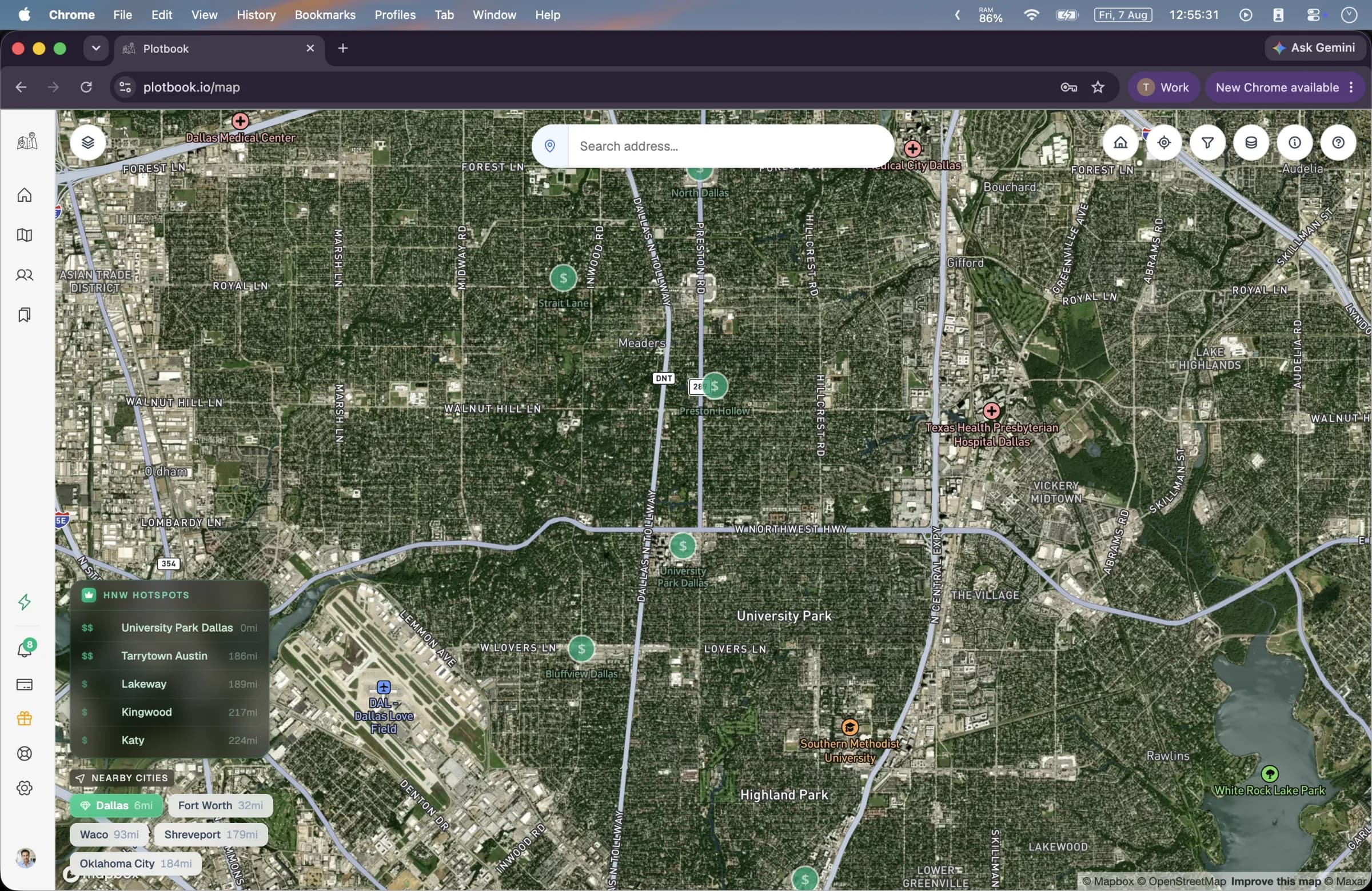
Search the city, ZIP, or address at the center of your constituency and the map lands there. Parcels appear from zoom 14, colored across six assessed-value bands, so you can see the shape of capacity in a catchment area before you name a single household.
- 02
Set a capacity floor
Five value presets match the legend bands, from under $500K through over $10M. Set the floor where your major gift threshold really starts. Everything below it dims out, which turns a whole metro into a working list of a few hundred properties.
- 03
Read the record on each property
From zoom 16 the owner name from the county record is printed on the parcel itself. Clicking one opens the assessed value, the full address, the owner of record, and the use type. For a person-owned home, an instant lookup returns the owners and residents at that address together, with ages, phones, and emails.
- 04
Research the ones held by a trust
In wealthy neighborhoods a large share of deeds read as a family trust, an LLC, or a partnership. The research agent picks a playbook per owner type: for a trust it works county records toward the trustee and then the person the trust serves; for an LLC it works business registry filings and the tax-bill mailing address. It shows every source it used, so a researcher can check the trail before anything enters the database.
- 05
Qualify, annotate, and hand off
Each prospect saves with a capacity estimate, contact details, a written research summary, and the property it came from. Write your qualification notes on the record. When the portfolio is ready, export a CSV and import it into Raiser's Edge, Bloomerang, DonorPerfect, or whatever system your shop runs.
Capacity, honestly labeled
A capacity signal you can defend in a portfolio review
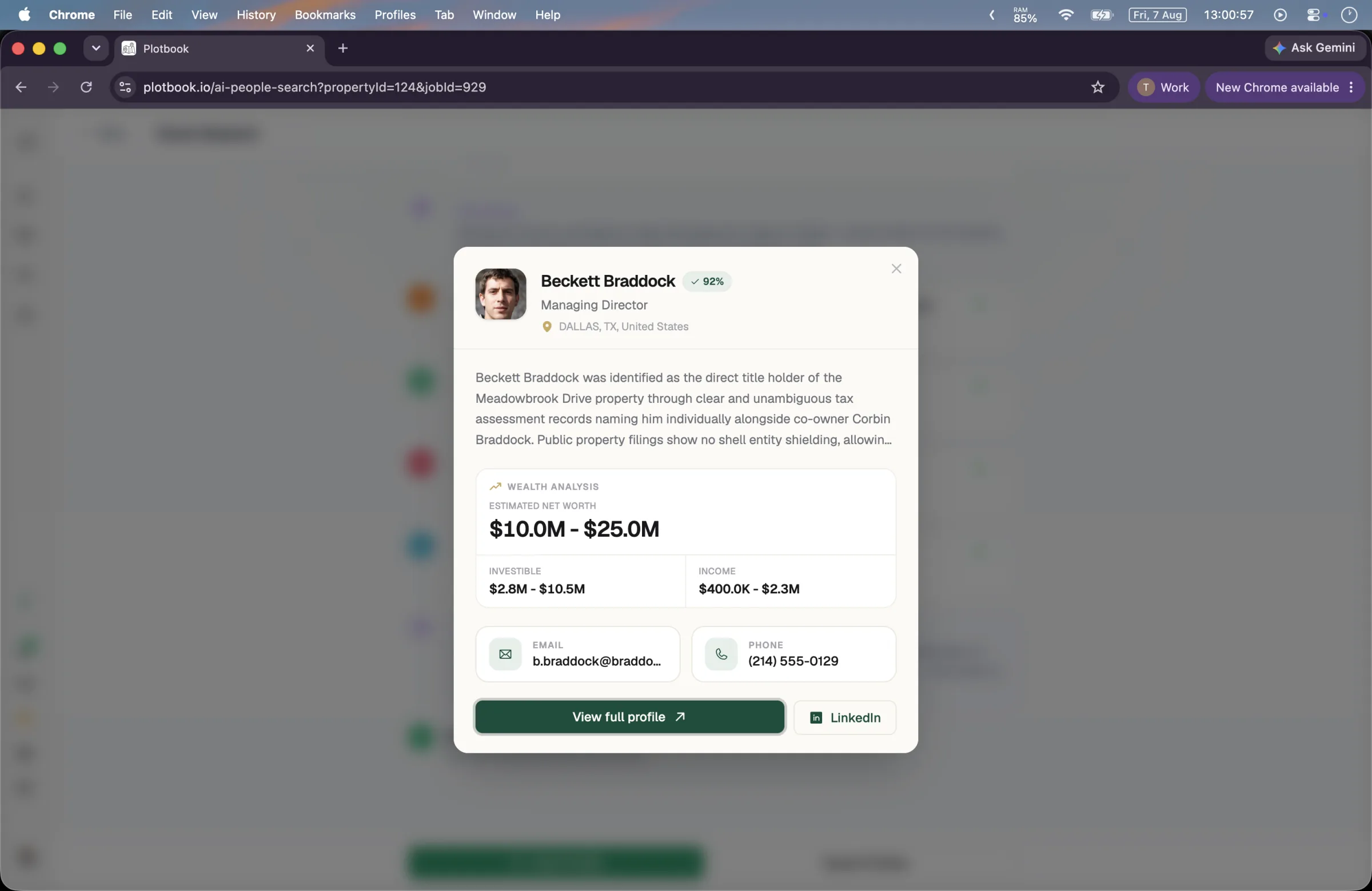
Every completed prospect carries a four-band estimate: net worth, income, investible assets, and total assets, each shown as a range with a confidence score rather than a single authoritative number. Alongside it sits the research summary, a written account of how the identification was made, and the property record that anchored it.
That combination is what makes the record usable in a portfolio review. A gift officer asking where a rating came from gets an answer with sources rather than a score with a black box behind it. Assessed value stays clearly separated from estimate: the first is a public record, the second is a model output, and the interface never blurs the two.
- Ranges with a confidence score, never a single fabricated figure
- A written research summary explaining the identification trail
- The linked parcel and assessed value kept visibly distinct from the estimate
- A control on every profile to report incorrect information, reaching a human
Into your database
Research that ends in your CRM, not a PDF
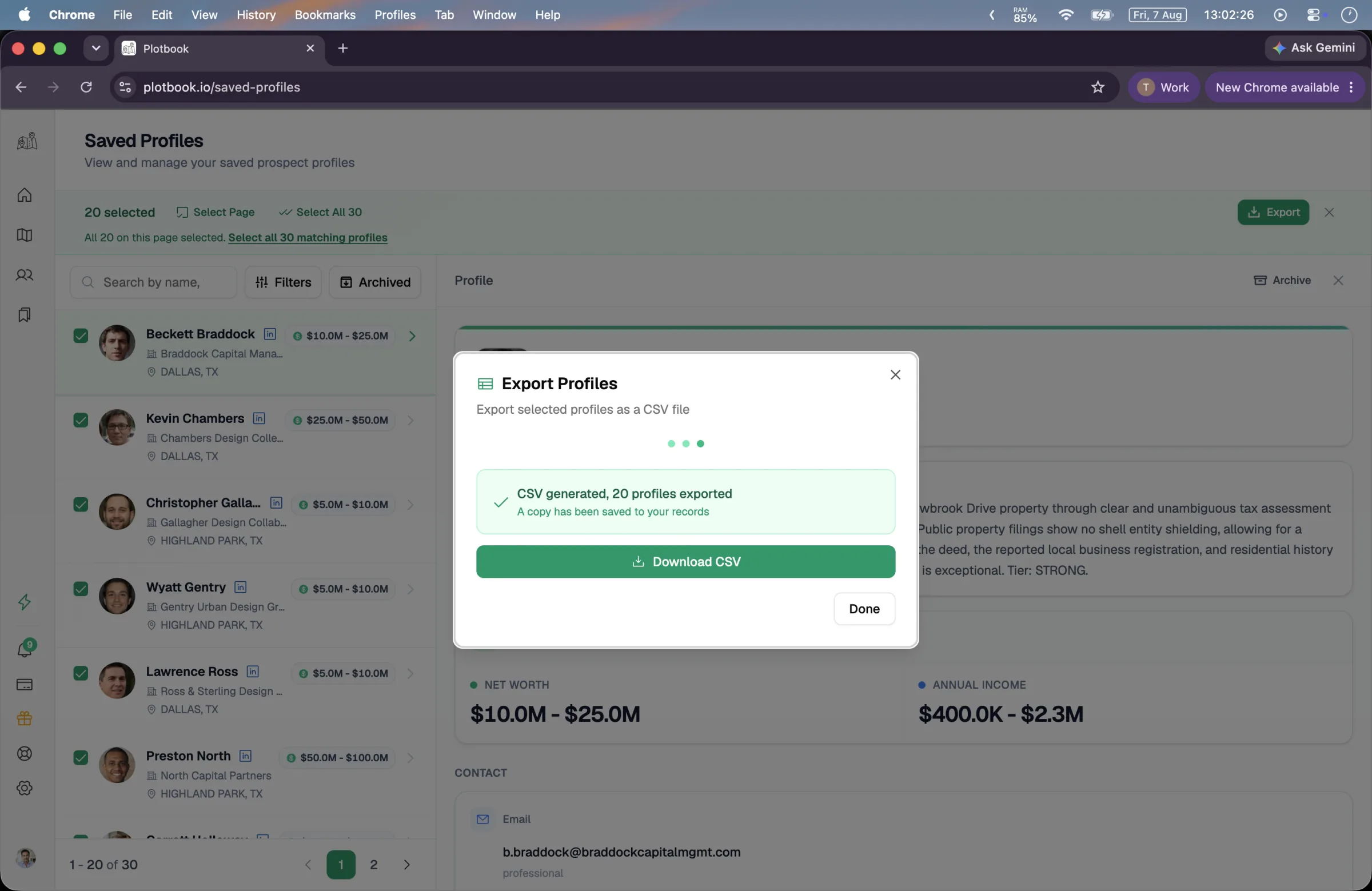
Prospect research that lives in a document nobody opens is not research. Plotbook's output is a structured export: 26 columns across 8 groups covering names, contact details, organization, location, wealth estimate ranges, the linked property address, employment and education history, and your own notes and research summary.
Pick the column groups your import template expects, generate the file, and download it from a link that stays live for 48 hours. Exports up to 5,000 profiles are supported on Professional and Enterprise, and every export is recorded on the account so a research shop can see what left and when.
- 8 toggleable column groups, 26 columns in total
- Your qualification notes travel with the record
- Up to 5,000 profiles per export, on Professional and Enterprise
- CSV only, deliberately: no silent two-way sync into your donor database
What you get
Identification work, done in an afternoon
The same five tools the rest of Plotbook runs on, framed for a development shop that needs new qualified names rather than better scores on old ones.
Service-area screening
Nationwide parcel data from Regrid, covering 150M+ parcels, colored by assessed value so a catchment area reads as capacity at a glance.
Household identification
For person-owned deeds, one lookup returns owners and residents at the address with ages, phones, and emails, deduplicated and role badged.
Trust and LLC research
An autonomous agent works entity-held deeds through registries, mailing addresses, and public records to a named person, showing its sources.
Capacity estimates as ranges
Net worth, income, investible assets, and total assets, each a range with a confidence score, sitting next to the public record that anchors it.
A portfolio that holds context
Saved prospects keep the research summary, the linked property, and your qualification notes, so the reasoning survives a staff change.
CRM-ready export
A 26-column CSV with selectable groups, built to drop into Raiser's Edge, Bloomerang, DonorPerfect, or Salesforce NPSP import templates.
What a campaign costs
Cheap to look, priced to research
Mapping a service area and reading deed owners is included in the subscription. Credits are spent only when a paid data source is called, and any failed operation is refunded automatically.
- Household lookup on a person-owned home
- 15 credits
- Deep research on a trust or LLC deed
- 25 credits
- People search when you start from a name
- 2 to 14 credits
- CSV export into your donor database
- 5 credits
Owners and residents at the address, with contact details.
Charged only on success. A dead end costs nothing.
For qualifying a board referral or an event guest list.
Professional and Enterprise. Up to 5,000 prospects per file.
Professional is $199 a month with 2,500 credits, which is roughly 40 entity research runs or 160 household lookups: enough to build a gift officer's portfolio from scratch in a quarter. Plans are licensed by state (1 on Starter, 2 on Professional, 5 on Enterprise) with more available as an add-on, which matches how most organizations define a service area. New subscribers get a 7-day free trial with 100 credits.
Where Plotbook stops
What it will not tell you
Prospect research runs on trust, so the boundary matters more here than in most categories. This is the part the old version of this page got wrong.
There is no giving history
No gift records, no philanthropic propensity score, no RFM analysis, no foundation or 990 data, and no board affiliation database. Plotbook estimates capacity from property and professional signals. Affinity and inclination remain your job.
It does not replace screening
If your problem is scoring an existing constituent file, a screening vendor solves that better. Plotbook is the identification half. Most shops that use both run screening on the database and Plotbook on the map.
Wealth figures are estimates
They are AI-generated, shown as ranges with a confidence score, and should never be entered in a donor record as a verified rating without your own review. Assessed property value is public record and is labeled separately.
It does not manage moves
There are no pipeline stages, no solicitation tracking, no proposal management, and no task assignment. Prospects export as a CSV and your CRM owns everything downstream.
The natural setup is Plotbook for identification and capacity on new names, your screening vendor for the database you already hold, and your CRM for moves management once a prospect is qualified.
See it run
See a prospect built from scratch
The full walkthrough: a neighborhood on the map, a research run on an entity deed, and the finished profile exporting to CSV.
Full walkthrough, 3 min. All people, contacts and wealth estimates shown are fictional demo data; property records are real public data.
Questions
What nonprofits and fundraisers ask first
Start with the neighborhoods you already serve
Point the map at your catchment area and see what is actually there. If the names surprise you, that is the pipeline you were missing.
New subscribers start with 7 days and 100 credits. We email you before the trial ends.