Runbook
From a name on a deed to a way to reach them
A name on a parcel is not a prospect until you can contact them. There are two ways into that in Plotbook — start from the property, or start from the person — and picking the wrong one is the most common way to spend credits for a worse answer. This runbook is the decision, the procedure for each door, and an honest account of when the contact details simply are not there.
Before you start
Pick the right door first
Both doors lead to the same place — a saved profile with contact details — but they query different kinds of data and they are priced differently. The choice is determined by what you already have.
What you need
Either an address or a name
If you are holding a property and want whoever is attached to it, that is the address-first door and it queries residential records. If you are holding a person and want to reach them professionally, that is the name-first door and it queries professional contact databases. Having both is ideal and neither is required.
A deed that names a human
The address-first door works from residential records, so it needs a person to exist at that address. An LLC or trust deed has no human in those records, which is a different runbook entirely — the research pass, linked below.
A US target
Every source here is US-only, and the professional search hard-limits itself to United States locations. There is no international coverage to fall back on.
What you end up with
Contact details, unmasked
Professional and personal emails, phone numbers, and social links, with invalid addresses filtered out. Previews arrive masked and the full values are revealed when you keep the record, which is the pricing model rather than a dark pattern — you are charged for retrieval, not for looking.
Household and address context
The address-first path returns the owners and the residents at a property, each badged by role, so co-owners and household members are visible instead of being collapsed into a single name. Pulling the full person record adds address history, relatives, and other properties they are recorded as owning.
A record of where each field came from
Multi-source results carry per-provider source badges and a match reason, plus a confidence score that rises with independent corroboration. You can see which database contributed which fact.
The run
Two doors, one destination
Steps one and two are the address-first door. Steps three and four are the name-first door. Step five is the same for both, and it is where the masked values become real ones.
- 15 credits per lookup, covering every person at the address
Run the instant owner lookup
Open the parcel on the map and use the Owner Lookup card in the property drawer.
This queries residential property records for the address and returns two groups: the owners of record and the people currently resident there. The dialog merges them into one list with a role badge on each person, so a spouse, an adult child, or a co-owner is visible rather than hidden behind the single name printed on the deed.
Each person comes back with name, age, phones, emails, and where available a company and job title. Records for deceased people are filtered out. You can save one person or save them all.
The street address is normalized before the query and retried against an alternate city when the first attempt misses, which matters more than it sounds like — address formatting is the most common reason a lookup that should work does not.
Watch for: The lookup is one charge for the whole address, not per person, and it is not charged at all when nobody comes back. Keeping a person adds 5 to unlock their full record, and every person you keep is priced the same way, so unlock the people you will actually contact rather than the whole household. Reopening the same address within 90 days is free.
- 2No credits
Decide what a thin result means
If the lookup returns a name but no reachable contact, stop and choose deliberately rather than immediately re-running.
Coverage genuinely varies by person and market. Some people appear in residential records with a current phone and email; others appear with an address history and nothing to dial. There is no way to know in advance which, and no hit-rate claim worth making.
When the person is professionally identifiable — they run a business, hold a title, appear on a company site — the name-first door is the better second attempt, because it queries an entirely different class of database. When they are not, the honest answer is that the contact detail may not be available anywhere, and spending more credits will not change that.
Watch for: Re-running the same address a second time queries the same source and gets the same answer. Change the door, not the attempt.
- 32 credits per Apollo or RocketReach search · 5 for WhitePages · 4 advanced, or 9 when a personal name pulls in residential records
Describe the person in plain English
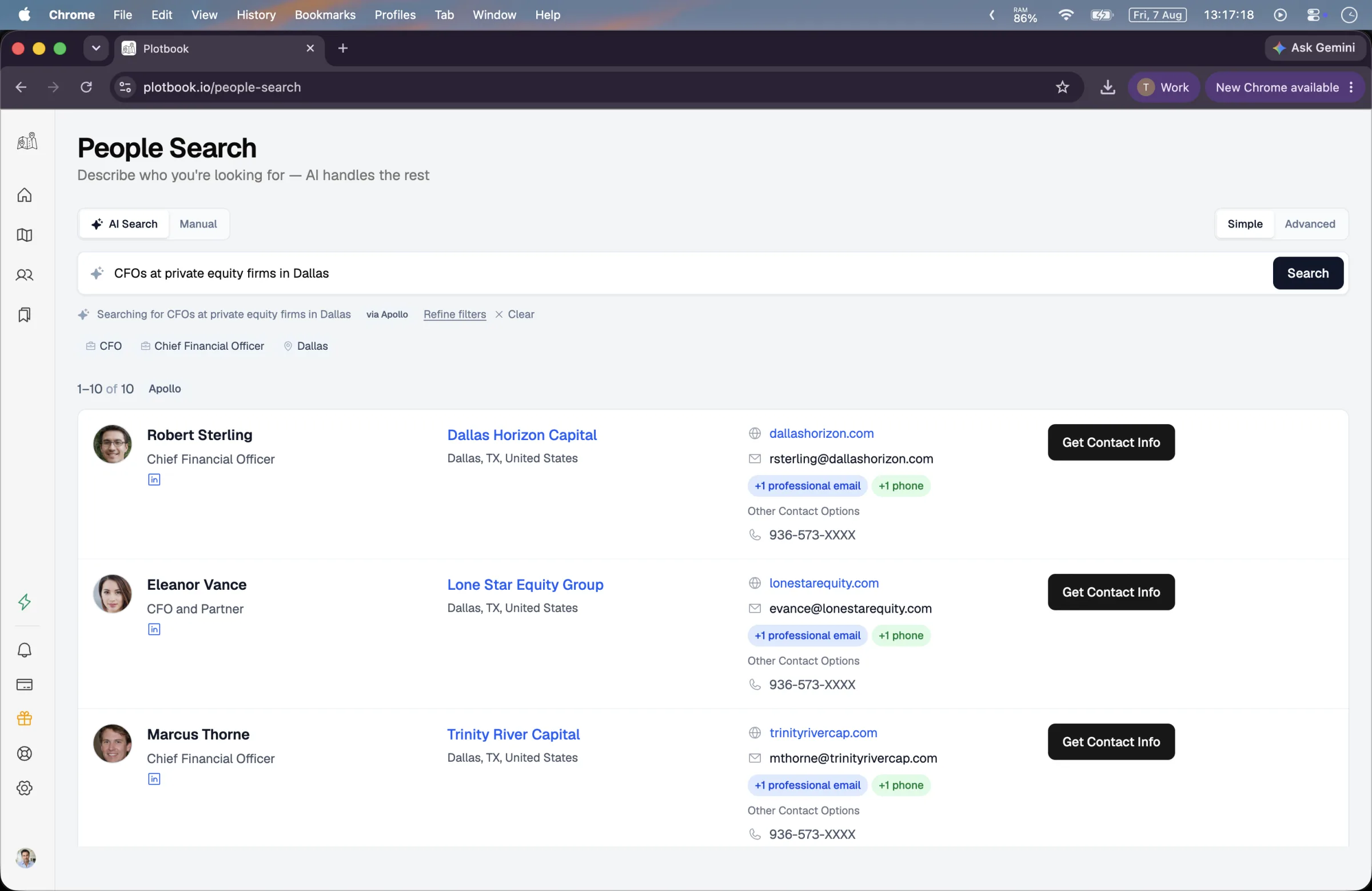
Go to people search and type what you know: a name and a city, or a role, a company, and a location.
The query is interpreted by a model into structured filters — job titles expanded into their synonyms, companies, locations, headcount, names — and that interpretation is shown back to you in a sentence so you can see how it was read before anything is charged. Parsing itself is free and deliberately so; only the data call is billed.
Simple mode picks one provider and tells you which, with an escape into manual filters if the interpretation missed. Advanced mode fans out across professional and residential sources in parallel, which is the mode worth using when you are unsure which database will have your person.
Manual filters are there when you would rather be explicit: keywords, job titles, locations, companies, and company size. Two things do not exist and are worth knowing about — there is no net-worth filter and no industry dropdown on this screen.
- 4No credits
Read the merged results
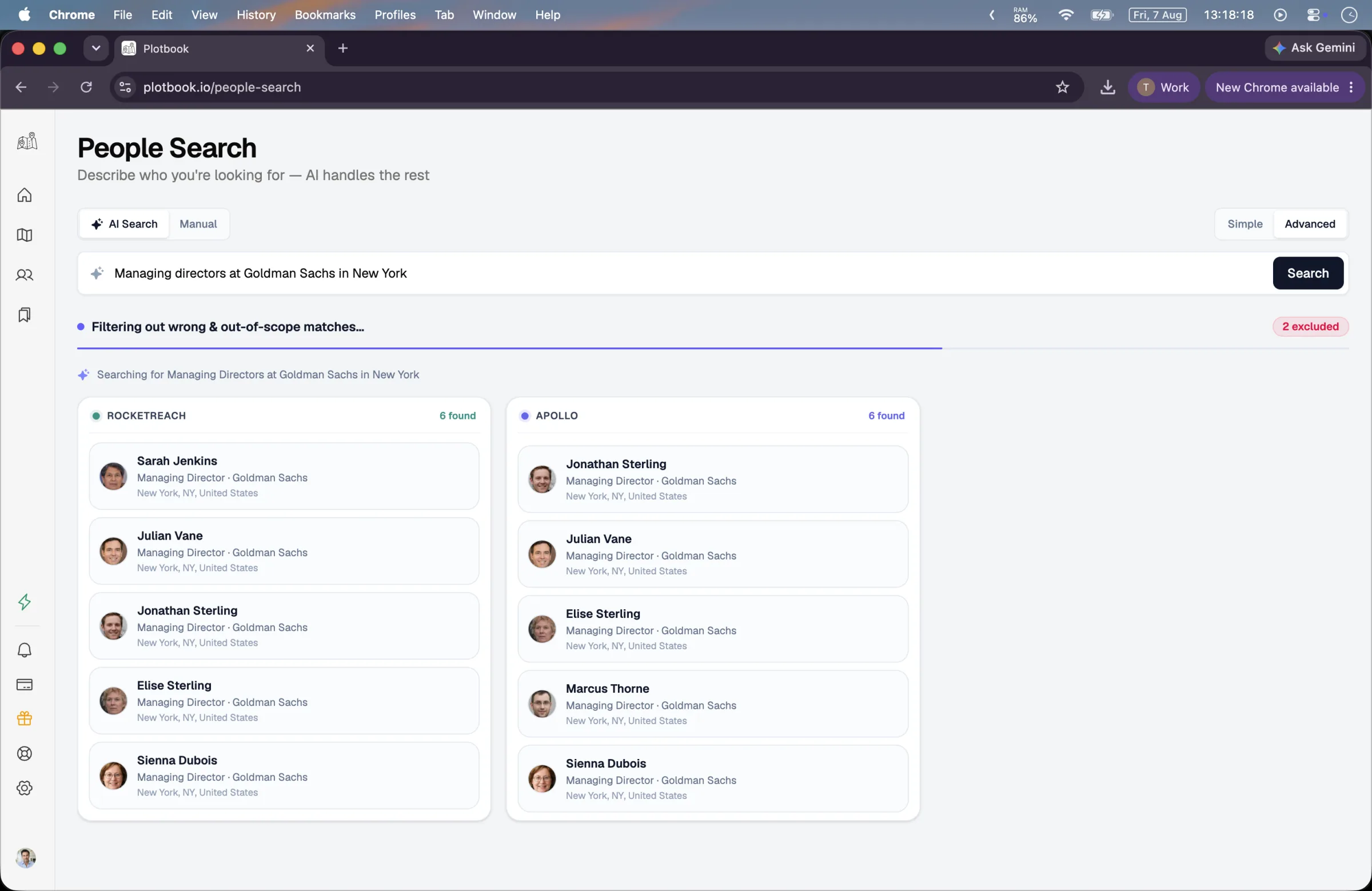
In advanced mode, watch the per-provider lanes resolve and read the match reason on each surviving record.
After the fan-out, a second pass groups the same person appearing across several sources into one record, drops the ones that do not belong with a short stated reason — wrong person, non-US, deceased, too sparse — and ranks what remains with a confidence score.
The important design detail: the model only decides which records belong together. The actual field merge is deterministic code in the server, which is what makes it structurally impossible for a contact detail to be invented by a language model. Confidence carries a corroboration floor, so a person confirmed by three independent sources scores at least 90 and two sources at least 75.
If the analysis pass fails, you still get results — the fallback returns them undeduplicated rather than returning nothing.
- 510 credits to enrich, only when a match is found · saving is free · 5 to unlock a residential record
Save the profile to unmask the details
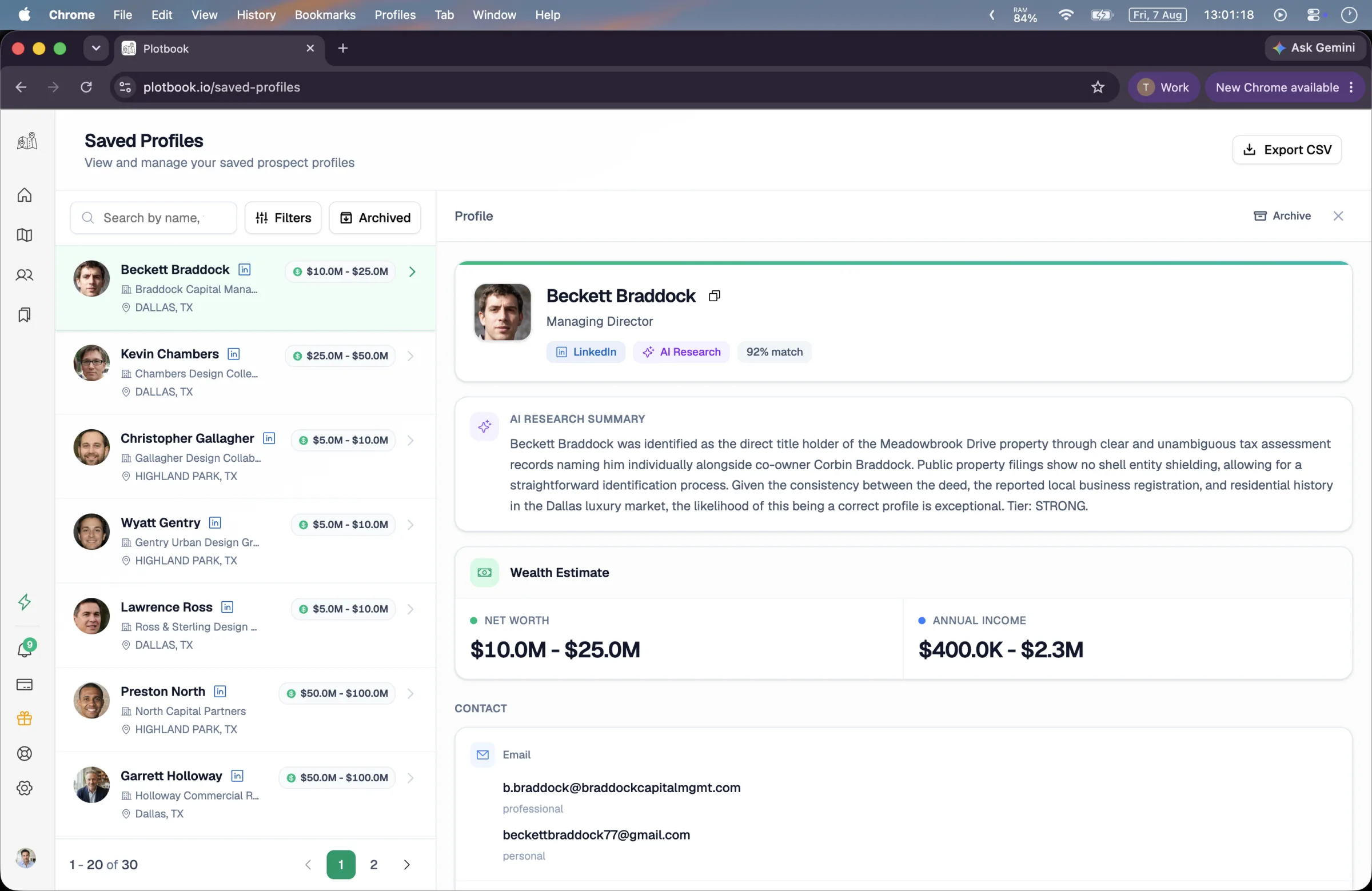
Save the person. That is the step that turns masked previews into full contact values and builds the profile out.
Previews arrive partially masked. Saving is free. When the person can be matched in RocketReach, the enrichment behind the save costs 10 credits, charged only when that lookup returns them, and writes the full record: professional and personal emails with invalid ones filtered, phone numbers, social links, employment and education history, and the property portfolio if a parcel is linked.
A person from residential records is unlocked for 5 credits, which pulls their full residential record: current and previous addresses, relatives, and other properties recorded to that person. That is the step that most often turns one contact into an understanding of a household.
What happens next is up to you and your compliance process, because it happens somewhere else. Plotbook has no email sending, no dialer, and no sequencing of any kind. That is a deliberate position rather than a missing feature: it is research software, and the outreach happens in whatever system your firm has already approved.
What one pass costs
Both doors, side by side
Priced for a single person taken all the way to a usable record. The address-first path is one larger charge that covers everyone at the property; the name-first path is a smaller charge that finds one person more precisely.
One owner you have already identified on the map, taken from the parcel through to a saved profile with unmasked contacts and full address history.
- Reading the parcel and the deed owner
- Free
- The map, the owner label, and the property drawer. Unbilled on every plan.
- Instant owner lookup
- 5
- One charge for the address, returning every owner and resident with role badges, ages, phones, and emails.
- Unlocking and saving the person
- 5
- Pulls the full residential record, with address history, relatives, and other recorded properties, and writes it into the prospect book. The save itself is free.
- Or: name-first, single provider
- 2
- The alternative entry point when you have a name rather than an address. Query parsing is free either way.
- Or: name-first, multi-source
- 4
- Parallel fan-out with AI deduplication and corroboration scoring. Rises to 9 when a personal name pulls residential records in.
- Total
- 16
- Credits for the worked example above, at the same prices the app bills from.
The address-first path to a finished profile is 10 credits, and each further person at the same address is 5. Reopening an address within 90 days is free, and a lookup or search that finds nobody is not charged. Query parsing never costs anything, so refining a search until the interpretation reads correctly is free — only the data call is billed, and a failed billed operation refunds automatically.
Where it goes wrong
When there is nothing to find
Contact data is the part of this product with the most variable coverage, and pretending otherwise would be the easiest place on the site to mislead someone.
Some people are genuinely not in the records
No hit rate is published because none would be honest across markets and demographics. A person can come back with a name, an age, and nothing reachable. When that happens the answer is usually that the data does not exist rather than that you searched wrong.
An entity deed has no household
The address-first lookup reads residential records, and an LLC does not live anywhere. Commercial parcels are readable on the map and route to research in practice, because commercial deeds are usually entity-held. That is a different and more expensive run.
The name is right and the person is wrong
Common names in large metros are the failure mode here. The multi-source merge drops mismatches with a stated reason and scores what survives, but a single-source result on a common name carries much less corroboration than the score alone suggests. Read the source badges, not just the number.
There is no outreach here, by design
No sending, no dialing, no sequences, no templates. If you were expecting the workflow to end in a first-touch email, it ends one step earlier than that, and everything after the export is your firm's system and your firm's compliance process.
Variations
Same goal, different starting point
What to do when the door you would normally use is closed.
- 01
You have the address but the deed names an entity
Do not spend on the instant lookup — it has no human to find. Go straight to the research run, which is built for exactly this and is charged only when it succeeds.
- 02
You have a business card and no property
Run the name-first door in advanced mode and save the profile. If the person owns property in a state you are licensed for, the linked parcel and the wealth ranges come in behind them without a separate lookup.
- 03
You want the household, not the individual
The address-first door is strictly better here, because one charge returns owners and residents together with roles. Then pull the full residential record on whichever of them matters, which adds relatives and address history.
- 04
You are working a list of addresses
There is no bulk import or batch lookup. Each address is worked individually from the map, which is a real constraint on volume and the honest answer to whether this replaces a bulk skip-tracing vendor. It does not.
Questions
What people ask about this run
Keep reading
People search
The name-first door in full, including how the multi-source merge works.
Reverse address lookup
The address-first door, and what a household record holds.
Find the owner behind an LLC
What to do instead when the deed names an entity rather than a person.
Trust and data sourcing
Which fields are public record, which are licensed, and how removal requests work.
Test the coverage on somebody you know
One lookup against a person whose details you can already verify tells you more about whether this works for your market than any coverage claim we could print here.
New subscribers start with 7 days and 100 credits. We email you before the trial ends.